Every taker’s copy, live in one click
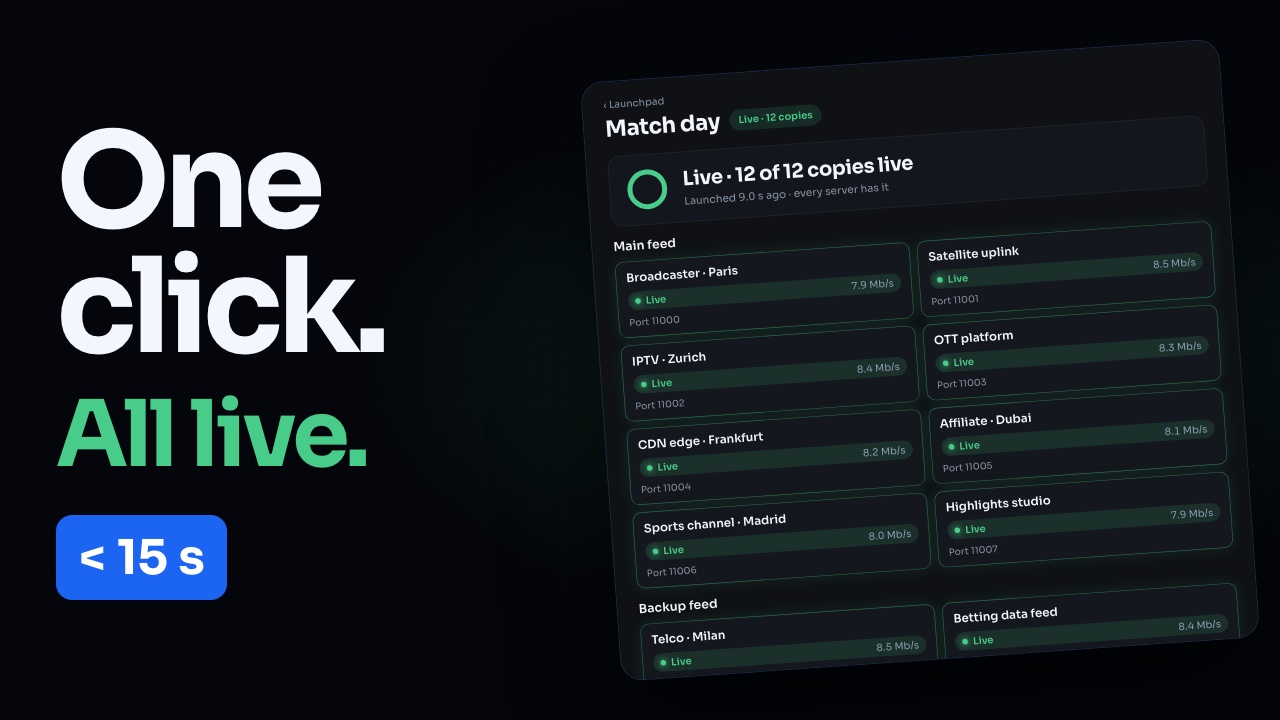
Launchpad prepares every copy in advance — each taker’s address, port, passphrase and SRT settings — and puts them all live together, typically within 15 seconds. For outages (Instant Fallback), match nights, channel rollouts and onboarding many takers at once. Each taker contact is emailed how to pull their copy.
Launchpad in 59 seconds · Instant Fallback in depth: full tutorial & transcript →
Use cases
One launch for every moment that can’t wait.
-
Instant Fallback
Distribution disaster recovery: when a satellite or primary path drops, put the recovered feed back out to every affiliate, telco and operator in one click — no phone tree.
-
Match days & live events
Every rights holder’s copy for kick-off, prepared the week before and launched on the night. Stop at the final whistle.
-
Channel rollouts
A new channel goes on air to all its distribution partners at once, with each partner’s settings checked in advance.
-
Onboarding many takers
Bring dozens or hundreds of new takers live together from one sheet, each emailed exactly how to pull their copy.
How Launchpad works
Preconfigured. One action. Everyone connected.
-
1
Build your launches
Prepare every taker’s copy in advance — address, port, passphrase, allowed sources and every SRT option — by hand, from a CSV sheet, or from a template (“20 copies on Match 1”).
-
2
Share the addresses ahead of time
Send takers their sheet, or let Launchpad email each contact. Ports and names stay reserved for them, so receivers can point at the address long before the day.
-
3
Launch in one click
Every copy goes live together — from the dashboard or by asking your AI agent. Typically under 15 seconds, with a live board that shows each taker connect.
-
4
Stop just as fast
One click takes every copy off again. The launch, its sheet and its addresses stay, ready for next time.
What's included
Built for broadcasters, telcos & operators.
The same copy machine you already know — with launches of many copies on top.
- Launches of standby copies on your existing inputs — one click on, one click off
- A standby allowance set for your contract, separate from per-copy licenses
- Launch sheet (CSV) round-trip with every SRT option, plus a takers’ sheet
- Taker contacts emailed their pull details at launch
- Live board built for hundreds of connections, with what to fix per input
- Same controls for your AI agent (MCP) — launching always needs your yes
Transcoding · preview
Every version your takers need, from one feed.
Send us one feed. We re-encode it into the versions you choose (HD, SD interlaced, HEVC, MPEG-2, audio only) and send each version to as many takers as you like over SRT. Pick a format for each version, or open Advanced settings to tailor every detail, and see the price.
Your setup costs
€5,074 per month, excl. VAT
- Input processing 1080p50 · H.264 (AVC) · 15 Mbps €339
- 1080p50 · H.264 · 8 Mbps AAC stereo · 192 kbps · 5 takers €1,500
- 720p50 · H.264 · 5 Mbps AAC stereo · 192 kbps · 5 takers €1,322
- 576i25 · H.264 · 3.5 Mbps AAC stereo · 192 kbps · 3 takers €626
- Copies 13 × €99 Professional license €1,287
- Prices exclude VAT. Each copy is a Professional license, like every other copy.
Quote TQ-68EFB5C26D · same setup, same price
Questions
Launchpad, explained
What is Launchpad?
Launchpad is SRT Cloud Enterprise’s way to put many copies live at once. A launch is a saved set of standby copies on your existing inputs — each taker’s address, port, passphrase and SRT settings prepared in advance. One click puts them all live; one click takes them off. The launch stays for next time.
What is Instant Fallback?
Instant Fallback is distribution disaster recovery — the outage use case of Launchpad. When a feed drops, you launch a prepared fallback and the recovered signal goes back out to dozens or hundreds of takers in one click, each one emailed where and how to pull it.
How is this different from hitless or path failover?
Hitless/path failover (SMPTE 2022-7-style) protects a single input across redundant network paths. Instant Fallback protects the other side: distribution. It re-establishes the feed to every downstream taker at once — the mass output recovery that input redundancy alone does not solve.
How fast do copies go live?
One click writes every copy and each server picks it up on its next check-in, so copies are typically live within 15 seconds (worst case around 20). The live board counts the servers that have the launch and shows each taker connect.
What columns does the launch sheet have?
One row per copy: input, copy_name, mode (listener or caller), port, remote_host, remote_port, latency_ms, passphrase, allowed_sources, one column per SRT option (pbkeylen, streamid, maxbw and the rest), contact_name, contact_email and notes. Download a launch to get the exact sheet; Excel and Google Sheets files both import, and nothing changes until every row is clean.
What happens if an input is stopped when I launch?
The launch goes ahead for everything else and tells you exactly what to fix — for example “Match 5 is stopped — start it and its 4 copies connect automatically.” Its copies are already in place, so starting the input is enough; there is no need to launch again.
What does Stop do?
Stop removes every live copy of the launch from its server, so takers stop receiving it. The launch, its copies, ports and passphrases stay, so the same addresses work the next time you launch.
How many copies can a launch hold?
Your Enterprise contract sets a standby copy allowance across all your launches. Launch copies use that allowance, not your per-copy licenses, so a launch never fails for lack of licenses.
Can an AI agent run a launch?
Yes. Your connected AI assistant (Claude, ChatGPT, Cursor) can prepare launches, fill them from a sheet and run them — it always shows you what will happen and asks for your yes before launching or stopping.
What is transcoding, and how is it priced?
Transcoding (in preview) re-encodes your one feed into the versions your takers need — for example 1080p50 H.264, SD 576i interlaced, HEVC, MPEG-2 or audio only — and sends each version to as many takers as you like over SRT. You pay a monthly price for the input and for each version (it depends on codec, resolution, frame rate, bitrate, location, hours and redundancy), plus one license per taker copy as usual. The calculator on this page shows the exact price; a 12-month term costs less.
How is Enterprise priced?
Enterprise is custom — it depends on your standby copy allowance and your inputs. Talk to our team and we will scope it with you.
Talk to our team
Tell us about your feeds and we'll scope an instant-fallback plan with you.